 Contents
Angular
7 January 2025
Notes
-
Dom events accept an function call instead of a callback
-
Can access child component through @viewChild() decorator
Access 'this' key work in callback function
- Use bind() method:
window.addEventListener("mousedown", this.handleClickOutside.bind(this));- Use arrow function:
handleClickOutside = (e: Event) => {}Directive
Directives add behavior to existing elements and components.
Structural directives: *ngIf, *ngFor add/remove DOM.
Attribute directives: [ngClass].
<ng-content/> can only exist once
<ng-template #projected>
  <ng-content/>
</ng-template>

<div *ngIf="template === '1'">
  <ng-container *ngTemplateOutlet="projected" />
</div>

<div *ngIf="template === '2'">
  <ng-container *ngTemplateOutlet="projected" />
</div>
Lifecycle Hooks
Constructor
-
When constructor is called, by that time, input properties are not updated
-
When constructor is called, by that time, the child constructor are not called
-
The content of component not available by the time constructor called
ngOnChanges
-
First time run for all @Input(), and then run whenever input variable changed
-
The first ngOnChanges runs before ngOnInit.
-
For primitive variables
ngOnInit
-
Run once
-
Run before before every time angular check component template changes
-
Use for initialize variables, call api
ngDoCheck
-
1st: Run to check if component has ngOnChanges or not
-
2nd: Run if component has ngOnChanges
-
3rd…: Input variables
-
For primitive and non-primitive variables
-
One of the use cases is use to get elementRef of conditional element
ngAfterContentInit
-
Call once after first ngDoCheck
-
Called after components external content (ng-content...) has been initialized.
-
ngAfterContentChecked
-
Run whenever input variables changes
ngAfterViewInit
- Respond after Angular initializes the component's views and child views
ngAfterViewChecked
ngOnDestroy
ElementRef
<input type="text" #usernameInput />
<button (click)="handleClick(usernameInput)">Click</button>- Use @Viewchild() to access element
@ViewChild('usernameInput', {static: true}) usernameInput: ElementRef;Promise vs Observable
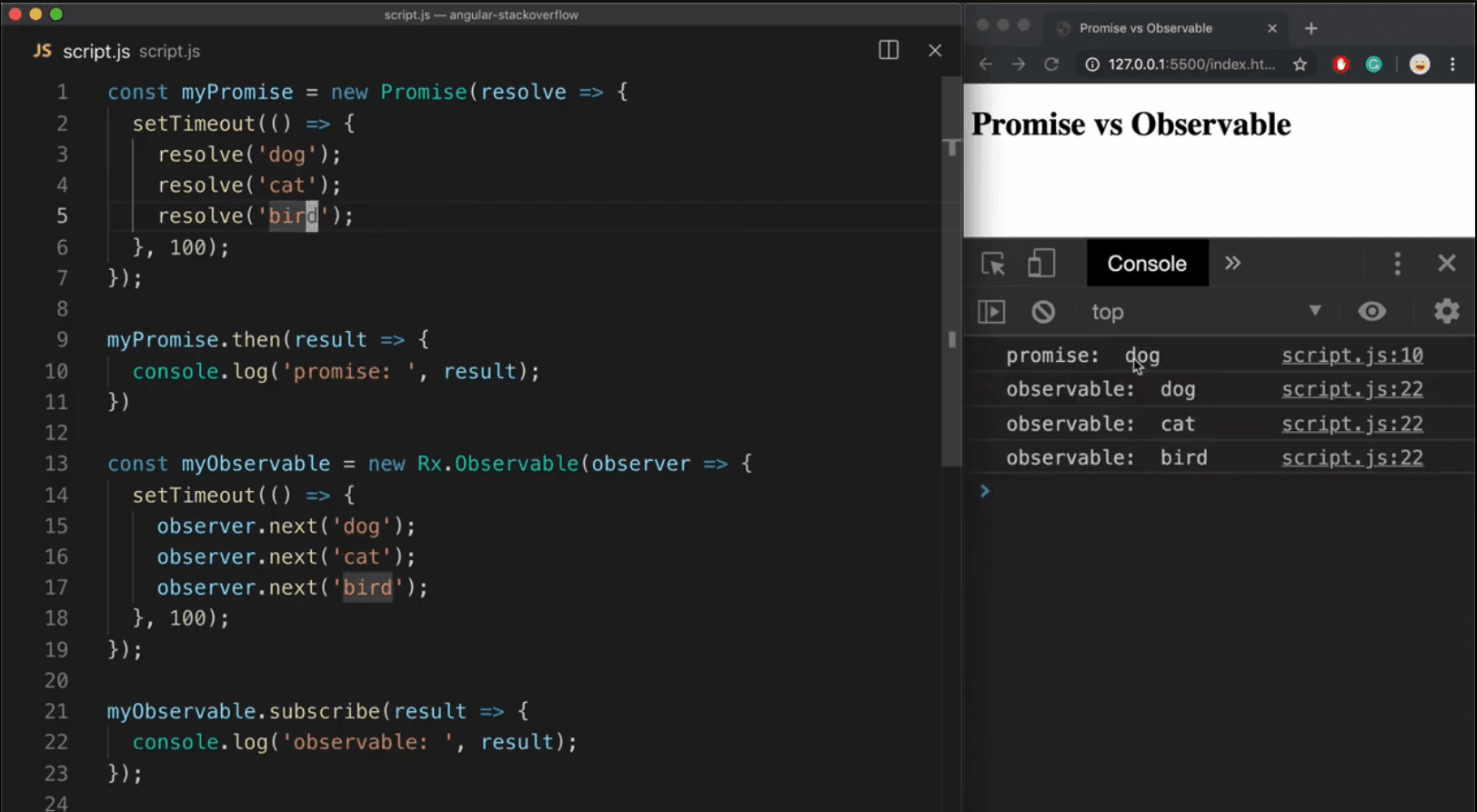
| Feature | Promise | Observable (RxJS) |
|---|---|---|
| Data Pattern | Push: Sends a single data packet and closes. | Stream: Can push multiple values over a period of time. |
| Sync vs Async | Always Asynchronous. | Can be Synchronous or Asynchronous. |
| State | Only three states: Pending, Resolved, Rejected. | Manages a lifecycle: Start, Next (data), Error, and Complete. |
| Execution | Eager: The code inside runs as soon as the Promise is created. | Lazy: The producer function only runs when .subscribe() is called. |
| Cancellation | Not native: Hard to stop a fetch request once it starts. | Native: Calling unsubscribe() stops the work and cleans up memory. |
| Retry Logic | Difficult; requires manual recursion or utility functions. | Easy; has built-in operators like retry() or retryWhen(). |
| Transformations | Limited to .then() chaining. | Extremely powerful via Pipeable Operators (map, filter, switchMap). |
| Multiple Listeners | Multicast: All listeners get the same resolved value. | Unicast by default: Each subscriber starts a new execution of the observable. |
Make with by Nguyen Huu Dat
© 2025