 Contents
Dart
23 March 2026
Basic
Init
Create new dart project
dart create cli

cd cli
dart run
Table
| Category | Type / Keyword | Mutable | Behavior |
|---|---|---|---|
| Numbers | int, double | ❌ | Values like 5 or 3.14 cannot be changed; variables just point to new numbers. |
| Strings | String | ❌ | Once created, characters cannot be altered. Methods like .toUpperCase() return a new string. |
| Booleans | bool | ❌ | true and false are constant singletons. |
| Collections | List, Map, Set | ✅ | Elements can be added, removed, or updated unless defined as const. |
| Collections | const [...] | ❌ | The collection is frozen at compile-time; attempting to modify it causes a runtime error. |
| Variables | final | ❌ | The variable cannot be reassigned to a new object, but the object's internal data can still change. (Variable Immutable) |
| Variables | const | ❌ | The variable is locked AND the object it points to is transitively frozen (cannot change anything inside). |
| Custom Classes | class | ✅ | Fields can be changed at any time unless marked final. |
Variable Immutability (final)
-
Example: final myList = [1, 2];
-
You cannot do: myList = [3, 4];
-
You can do: myList.add(3);
Var keyword
The keyword var tells the compiler: "I am not going to tell you the type; please figure it out yourself"
var name = 'dat';
const age = 23;
final feel = 'good';


String lastName = 'nguyen'
lastName = 'nguyen huu'

// this not gonna work
// var String fullName = 'nguyen huu dat';

int height = 175;
bool taken = false;

const String nickName = 'giao_su'
nickName = 'dat_dep_try' // error
Lists
Ordered, allows duplicate
List<String> fruits = ['Apple', 'Banana', 'Orange', 'Apple'];
print(fruits); // Output: [Apple, Banana, Orange, Apple]
print(fruits[0]); // Output: Apple
Common Methods: add(), addAll(), remove(), removeAt(), indexOf(), sort(), sublist()
Sets
No ordered, not allow duplicate
Provide fast lookup using contains()
Set<String> names = {'Zhang San', 'Li Si', 'Zhang San'};
print(names); // Output: {Zhang San, Li Si}
names.add('Li Si'); // Attempting to add a duplicate
print(names); // Output: {Zhang San, Li Si} (no change)
Convert between a List and a Set using the extension methods .toList() and .toSet(). Converting a list with duplicates to a set automatically removes the duplicates.
Maps
Map<String, int> inventory = {
  'cakes': 20,
  'pies': 14,
  'donuts': 37,
};


print(inventory['cakes']);
String interpolation
print("my name is $name");
print("my name is ${person.name}");
Function
void main() {
	final greeting = greet("dat", 23);
	print(greeting);
}

String greet(String name, int age) {
	return "Hi. my name is $name and I am $age";
}
List<int> scores = [50, 24, 11, 77];
print(scores[0]);
Generic
class Collection<T> {
	String name;
	List<T> data;

	Collection(this.name, this.data);

	T randomItem() {
		data.shuffle();
		return data[0];
	}
}


var foods = Collection<String>('food', ['noddle', 'pho', 'banh mi']);

var item = foods.randomItem(); // item is has String type
Use var when create class instance to keep cleaner
-
Long:
Map<String, List<User>> users = Map<String, List<User>>(); -
Clean:
var users = <String, List<User>>{};
Async
void main() async {

  Future<Book> fetchBook() {
    print("Fetching");
    const delay = Duration(seconds: 3);

    return Future.delayed(delay, () {
      return Book('Best book ever', 'Various author');
    });

  }

 var book = await fetchBook();
 print(book.title);
}

class Book {
  String title;
  String author;

  Book(this.title, this.author);
}
Fetching data
var uri = Uri.https('fakestoreapi.com', '/products/1');

var response = await http.get(uri);

if (response.statusCode == 200) {
  var jsonResponse =
      convert.jsonDecode(response.body) as Map<String, dynamic>;
  print("res: ${jsonResponse['title']}");
} else {
  print('Request failed with status: ${response.statusCode}.');
}
Special operator
Cascade ..
Allows you to perform a sequence of operations (method calls, property settings) on the same object without repeatedly typing the object's name
var paint = Paint();
paint.color = Colors.black;
paint.strokeCap = StrokeCap.round;
paint.strokeWidth = 5.0;
Using cascade
var paint = Paint()
  ..color = Colors.black
  ..strokeCap = StrokeCap.round
  ..strokeWidth = 5.0;
Null safety
late int x: Non-nullable, can be initialized later, but must be set before use.
int? x: Nullable, initialized to null by default if no value is provided
By default, all variables in Dart are non-nullable.
int? age; // 'age' can be int or null

int? nullableAge = 30;
int nonNullableAge = nullableAge!; // Null Assertion

String? name;
String user = name 	 'Guest'; // If 'name' is null, use 'Guest'

String? name;
int? length = name?.length; // Avoid runtime error
Local Shadowing
Product? product;
if (product != null) {
  return Text(product!.name); // The '!' forces it to be non-nullable
}


Product product = Product.blank();
// Now you can use 'product' without '!'
return Text(product.name);
final and const
final
Runtime: When you fetch data, you don't know what type of returned data is and you want to prevent the variable from being reassigned to a different map
// The variable 'userData' cannot point to a new map, but we can change its contents.
final userData = await fetchUserFromApi();

userData['lastLogin'] = DateTime.now().toString(); // This is allowed.

// userData = {}; // This is NOT allowed (reassignment error).
const
Compile-time: Before the app even runs.
const time = DateTime.now(); ❌
// The entire map is "frozen" and cannot be modified.
const rolePermissions = {
  'admin': 'full_access',
  'user': 'read_only',
};

// rolePermissions['guest'] = 'none'; // This would throw a runtime error!
Class
Dart is Library-level privacy scope, that mean code inside the same .dart file can see private field.get, set
// arrow syntax
String get name => _name;

// block syntax
String get upperName {
  return _name.toUpperCase();
}
Mutability and Memory
String? _name;
Test(this._name);
// Mutable: ✅ my_test._name = 'hehe';
// Memory: Create new instance every time call Test()
final String? _name;
Test(this._name);
// Mutable: ❌
// Memory: Create new instance every time call Test()final String? _name;
const Test(this._name);
// Mutable: ❌
// Memory: If you create const Test('A') in five different places
// Dart will only create one single object
// ❌
// String? _name;
// const Test(this._name); const constructor require final fieldsConstuctor
// Default constructor
Person(this._name, this._age);
// Same as
Person(String name, int age) : _name = name, _age = age;

// Named constructor for a guest user
Person.guest() : _name = 'Guest', _age = 0;

String? _name;
Test({this._name}); // ❌ Can't use a private field in a named parameter constructor.

String? name;
Test({this.name}); //✅

String? _name;
Test({String? name}) : _name = name; // ✅

String? _name;
Test(this._name); // ✅
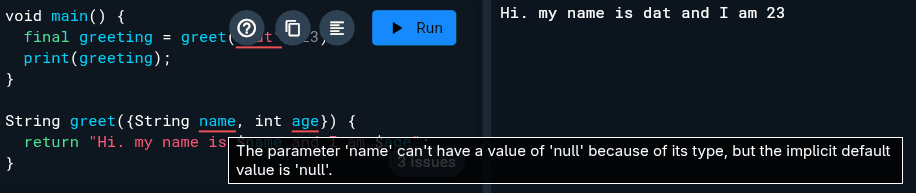
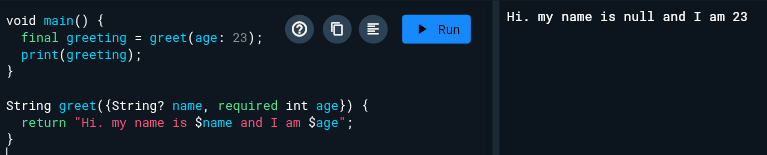
Named parameters option by default
Class Test {
	String _name;

	Test({String name}); // ❌ Can't do it, Name is type of String but named parameters is optional

	Test({required String name}); // ✅
	Test(String name); // ✅
}


Test(); // ✅ Valid if Named parameters
Factory constructor
Unlike a standard (generative) constructor, which always creates a new instance of the class Factory can:
- Returns the existing or new instance
- Include complex logic
With specific rules
- Must return instance
- Can't access
this - Can't use initializer lists
At a glance, a factory constructor looks like a static method at can't access this, to return object they must either:
-
Something already existing (like static variable)
-
Something new from from scratch
In short: A factory acts like a static method but is called like a constructor
// ❌ Error: Factory constructors cannot have initializer lists
// factory Point.atOrigin() : x = 0, y = 0 { ... }

// ✅ Correct: Use the factory to call a generative constructor
factory Point.atOrigin() {
  return Point(0, 0);
}

// Most use case
factory Product.fromJson() {
	return Product(...);
}

Product.fromJson(res.data);
A named parameter private constructor with an initializer list and a constructor body.
 Test._({required String name}) : _name = name {
    print(">>> Private constructor called with name: $name");
  }
A constructor call another constructor
Test.forwardToBlank() : this.blank();Way to instantiate
Global define
final dio = Dio(_options);
// Singleton
Static field
static final dio = Dio(_options);
// Singleton
Instance Field
final dio = Dio(_options);
// A new Dio instance is created every time create a object.
Instance Method (Factory-like)
Dio getDio() {
  return Dio(_options);
}
// A new Dio instance is created every time function called
As getter
static Dio get dio {
  return Dio(_options);
}
// A new instance every time you access it.
OOP
Keywords
extends vs implements vs with keyword
| Keyword | Inheritance | Requirement | Count |
|---|---|---|---|
| extends | Inherits both API and implementation. | Only need to override abstract methods. | Exactly one. |
| implements | Inherits API only (no code). | Must override every member of the target. | Multiple allowed. |
| with | Inherits implementation only. | Generally use logic as-is from the mixin. | Multiple allowed. |
abstract class Animal {
  void eat() {}
  void run() {}
  void walk();
}

class Duck extends Animal {
  @override
  void walk() {}
}

class Dog implements Animal {
  @override
  void walk() {}
  @override
  void eat() {}
  @override
  void run() {}
}
Mixin
mixin is a way to reuse code across multiple class hierarchies without using traditional inheritance
mixin Flyable {
  void fly() => print("I'm flying!");
}
mixin Walkable {
  void walk() => print("I can walk!");
}

// Applying multiple mixins using 'with'
class Duck extends Animal with Flyable, Walkable {}

void main() {
  var duck = Duck();
  duck.fly();  // Output: I can fly!
  duck.walk(); // Output: I can walk!
}
Abstract
Normal Class: All methods must have a body.
Abstract Class: Can have methods with or without a body.
abstract class Animal {
  void eat() => print("Eating..."); // Shared logic
  void makeSound(); // Must be implemented
}

class Dog extends Animal {
  @override
  void makeSound() => print("Bark!");
}
class Animal {
void eat() => print('Eating...');
}
mixin Swimmer {
void swim() => print('Swimming...');
}
abstract class Flyer {
void fly();
}
// Extends one class, implements another (contract), and uses a mixin (code reuse)
class Duck extends Animal with Swimmer implements Flyer {
@override
void fly() => print('Flapping wings...');
}Abstract vs Interface
| Feature | abstract class | interface class |
|---|---|---|
| Instantiation | Cannot be instantiated. | Can be instantiated (unless also marked abstract). |
| Inheritance | Can using extends or implements. | With different file only implements |
| Method Bodies | Can have both concrete and abstract methods. | Must have concrete bodies for all methods if it's not abstract. (abstract interface class) |
I want to define a class that can i implements later, what type of class should i use ?
abstract class
Why:
- It prevents anyone from creating an instance of the class (no Animal()), allows methods without bodies.
- Can both
extendsandimplements.
interface class
Why:
- It allows the class to be used as a normal class, but prevents people buidling a child (extends) outside your file.
- Your interface some default code, but users need implements it if they want to create their own version.
I want to define a class that can i extends later, what type of class should i use ?
normal class
Why: It allows full inheritance of all methods and variables.
abstract class
Why: same as implements
Make with by Nguyen Huu Dat
© 2025